The most important task for a payroll administrator is to get the pay right, on time, for all employees. That naturally puts pressure on the payroll administrator – and not least on the payroll system, which has to support the payroll administrator's work and automate the manual tasks that most often cause errors.
With that in mind, we've launched a new flow in the pay run process that helps payroll administrators get the pay right – quickly and easily.
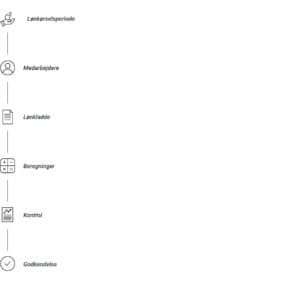
Overview of the pay run process:
What does the new flow mean in practice?
We've divided the pay run into different stages: you start by defining the period for the pay run and finish with control and, not least, approval. The control stage ‘locks’ the pay run, where all calculations are made and reports generated – including draft payslips.
If, as a payroll administrator, you want to generate all payslips at once, in the new flow you should go straight on to the control page and start by generating the drafts. Once all payslips have been generated, you can start the pay run itself and get to work.
Changes you make afterwards will only affect the individual payslips, with the result that downloading and updating draft payslips again will be considerably faster.
Payroll administrators who don't use draft payslips in their work should follow the system's pay run process and will see a marked improvement in speed.
Of course, you can still see a draft of each individual payslip in the pay run itself.
Why have you made this change?
Zenegy is one of the few payroll systems on the market that let payroll administrators download a file with both all payslips and all payslips combined in PDF format at once. For the system, generating a PDF file is a time-consuming task, and it only gets heavier with a pay run that contains many payslips.
By moving the option to download all payslips to the control page, and letting our customers choose their own checks, we can improve processing time for a great many who don't use the feature.
Introducing a control page also makes it possible to lock the pay run and make room for starting a new flow – approval.
But you'll be hearing much more about that at the start of the new year.
Avoid errors – easy checking of the pay run
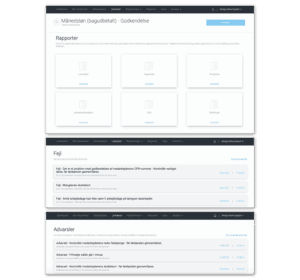
The control stage gives an overview of any errors and warnings in the pay run and helps the payroll administrator make sure each employee is paid correctly.
The overview is grouped so that notifications are divided by type and can be shown at employee or department level. You can also download a file with the employees affected for each error or warning.
Before approving the pay run, you can download the payment report, the accounting report, the tax report and many other useful reports that make a payroll administrator's work easier to manage. You can also choose to generate and download all payslips before the pay run, and look for deviations in the deviation report.
The deviation report is one of the payroll administrator's important tools for checking typing errors or differences in pay compared with the last pay run. In Zenegy, you can define a number of deviation parameters (under ‘My company’) for the pay run, so the payroll administrator always has an automatic check before the pay run is approved.
Better overview and faster navigation
A better overview means fewer errors! We've introduced quick filters that let you dive into the most important points in the pay run. For example, you can show the employees who are on their first pay run or have a termination in the current pay run.
As mentioned, the final calculation of the pay run takes place in the control stage. If there are errors and warnings in the pay run, you can go back and quickly filter on them. A new menu item – Notifications – has also been added for each employee, showing errors and warnings.
The new additions to the payroll journal give the payroll administrator a better overview of errors and omissions in the pay run and fast navigation between data.
Ease of use, overview and continuous development are some of the key words that make Zenegy a modern payroll system that helps payroll administrators run payroll correctly and efficiently – on time.