


 Expense
Get your expenses under control.No new cards. No new bank.
Receipts are scanned, card payments become expenses automatically, and out-of-pocket expenses are approved in the app. And it all ends up in your accounting system.
Trustpilot 4.7/5
9,000+ businesses use Zenegy

- My account
- Dashboard
- Organisation
- Expenses
- Finance
- System
- Suppliers
- Expenses
- Payment cards
- Inbox
- Settings
 CoopLunch, team meetingCard expense18/09/2026Open2960Andre personaleomkostningerDKK148.00DKK0.00
 DAOCourier, week 38Card expense17/09/2026Open1830FragtomkostningerDKK1,240.00DKK248.00
 BillettoJonas Holm · conference ticketEmployee claim14/09/2026In review41%2520KursusudgifterDKK2,000.00DKK400.00
 PowerMonitor, design teamCard expense09/09/2026Approved93%2310It-udstyr mv.DKK2,487.50DKK497.50
 VistaprintPosters, exhibitionCard expense02/09/2026Booked95%1870Udstillinger og dekorationDKK3,240.00DKK648.00

Features & overview
How you handle expenses in Expense.
From the card payment and the receipt to the reimbursement in the employee's account.
Payment cards
Use the cards you have today.
Connect your bank, and every card payment becomes an expense with supplier, amount and employee. If the receipt is in the inbox, Expense can attach it to the card expense automatically. If it's missing, you can see it straight away.
 Coop18/09/2026DKK148.00DAO17/09/2026DKK1,240.00DHDataskyen Hosting ApS15/09/2026DKK2,495.00
Receipts
The receipt is read automatically. You can see how confident the reading is.
Take a picture in the app, or send the receipt to your company's own email address in Expense. Expense reads the date, amount and supplier, and a percentage shows which receipts you should check.
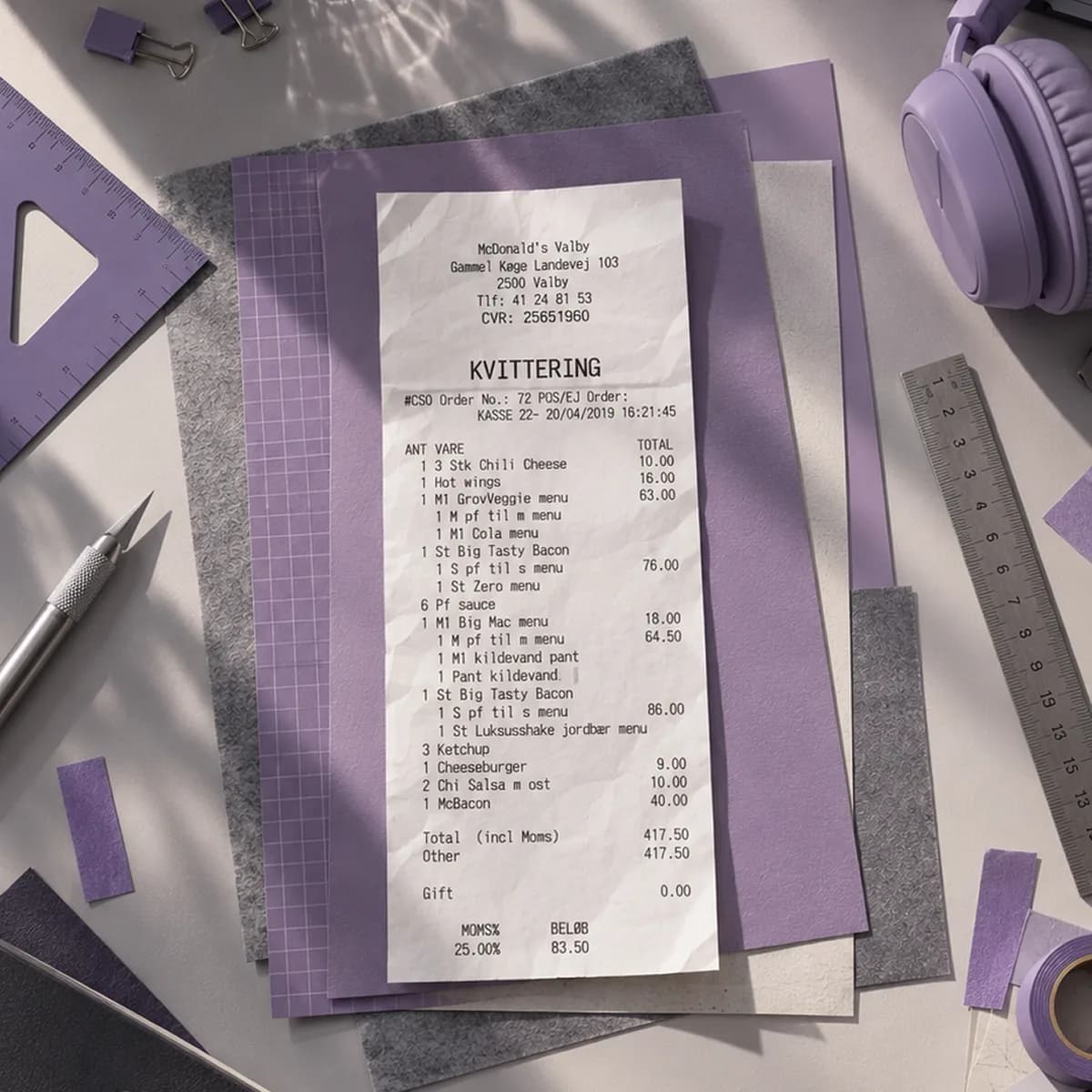
- Supplier
 McDonald's Valby
- Date
- 20/04/2019
- Amount
- 417.50 DKK
“They take a picture in the app, I get a notification straight away and approve it, and with the bank integration they have the money the next day. It's fantastic.”
 Sandie Fortner | Co-owner, Robust StyrkeRead the case: Robust Styrke saves an hour a day with all its finances in one system
Approval
The right approver. Every time.
Rules by position, employee, supplier, category and amount send every expense to the person who has to approve it. The approver is notified and can approve in the app.
Approval rulesTypeConditionApproverEmployee claimEmployeeSara Lindberg Ahmad RahimiBookkeeperEmployee claimCategoryConferences and courses
 Sara LindbergProject managerCard expenseSupplierVistaprint
 Mette KristensenDesignerCard expensePositionShop assistantEmployee responsibleCard expenseAmount0.00 - 750.00Auto-approved
Out-of-pocket expenses
Out-of-pocket expenses paid straight to the employee.
Approved out-of-pocket expenses can be paid straight to the employee's bank account from Expense, with a payment integration to your bank. Or with the next pay run, if you run payroll in Zenegy.
Initiated paymentsEmployee claimsEmployeePayment methodRequested amount Mads AgerboFlowers for the shopBank accountDKK249.00Sent to bank
 Jonas HolmTrain and hotel, client visitBank accountDKK1,655.00Sent to bankAcceptedSara LindbergTaxi, client meetingBank accountDKK386.00Sent to bankAcceptedAhmad RahimiProfessional booksBank accountDKK449.00Sent to bankAccepted
Suppliers
Regular suppliers whose expenses book themselves.
Set the account on a supplier once, and the expenses from that supplier can be booked automatically. Card payments too.
 MicrosoftVerifiedDetailsExpensesStatementStatisticsCommunicationAutomated actionsBook expenses automaticallyAccounts on supplier2321Software - EUAdd accountApply the account to all non-booked expenses
Employee app
Employees register out-of-pocket expenses in the app.
My expenses,and balance.
1,400.00 DKK
September4
 7-Eleven18/09/2026137.50 DKKIn reviewMicrosoft10/09/2026275.00 DKKApprovedVistaprint04/09/2026875.00 DKKApproved
- Register out-of-pocket expenses in the app
- Take a picture of the receipt
- See your card expenses in one place
- Approve expenses if you're an approver
- Message each other about an expense
- For iOS and Android
Expense on its own. Or included in Numbers.
Expense costs from DKK 249 per month for up to 5 users, and the price follows the number of employees you give access to Expense. If you have Numbers, expense handling is part of the plan, and you keep your bank and cards.
Expense
Expenses without the hassle. For you if you keep your accounting system.
fromDKK 249/month
On its own or on top of Payroll
Posts to e-conomic or Business Central
Approval rules and receipt scanning at no extra cost
No charge per expense

Numbers
Do you need the accounting too? Numbers is the complete accounting software, with expense management built in.
fromDKK 49/month
Try it free for 14 days
Users and expense receipts depend on the plan
- Expense: out-of-pocket expenses, company cards and receipts
- Invoicing and reminders
- Bank and bookkeeping
- VAT returns and reconciliation
- Approvals from Growth
- Free access for your accountant
- And much more
How to get started.
The 1-hour onboarding meeting is free, and we set up Expense together with you. You send us your chart of accounts and VAT codes, and at the meeting we connect your bank and go through the setup with you.
Activation
Activate Expense.
- Create an Expense agreement, or activate Expense in your Payroll agreement
- Give Zenegy Customer Care access to your agreement
- Book the meeting on our onboarding page
48 hours before the meeting
Send us this.
- CVR number
- The chart of accounts with account names, account numbers and VAT codes
- The VAT codes and their rates
- Which bank you use
- When you want to start, at most one month back
The meeting
We set it up together.
- Before the meeting, we import your chart of accounts and VAT codes
- In the meeting, we connect your bank
- We show you how to use and customise Expense
Afterwards
You're up and running on your own.
- Create more users
- Show your employees how to use Expense
- Adjust visibility, aliases and help texts in the chart of accounts
- Connect your accounting system, so expenses are transferred automatically

The onboarding meeting is free. If you'd rather get started yourselves, the Help Center guides you step by step.
Get started“But one thing is for sure: it's a switch we certainly haven't regretted.”
 Thomas Larsen | Head of Finance, FormulaRead the case: Formula – a fast-paced customer story
Trustpilot 4.7/5
Everything on your mind.
The answers are here.
Didn't find the answer?
We're right here.
- Talk to a specialistHans-Ulrich, Peter or Rune is ready
- Talk to support
 Anders, Lisa and Customer Care are ready
Do we need new payment cards or a new bank?
No. You use the bank and the cards you have today, and the card payments become expenses on their own. How well a card expense is linked to the individual card depends on the bank. See what your bank offers in Zenegy.
Does Expense work with our accounting system?
Expense sends its bookkeeping entries and the receipts to e-conomic or Microsoft Business Central. If you use another accounting system, you export the entries and receipts from Expense. If you use Numbers, expense management is already built in, and you don't need to buy Expense.
What's the difference between Expense and Numbers?
Expense is expense management on its own, for you if you're keeping your accounting system. If you have Payroll, you add Expense from your own account; otherwise you buy it by itself. Numbers is the complete accounting software with expense management built in: out-of-pocket expenses, company cards and receipts in every plan, supplier invoices on top, and approvals from Growth. See Numbers.
What does Expense cost?
From DKK 249 per month for up to 5 users, and the price rises with the number of users: see the prices. Only the employees you give access to Expense are counted: those who register out-of-pocket expenses, have a company card or approve expenses, and the administrators. The same price applies when you add Expense on top of Payroll. There is no charge per expense, and approval rules and the receipt scan cost nothing extra. All prices exclude VAT.
How do employees get their money back for out-of-pocket expenses?
Once an out-of-pocket expense is approved, you can pay it straight to the employee's bank account from Expense. That takes a payment integration, which you get through your bank: a Bank Connect agreement, or Danske Bank's payment integration if you bank with Danske Bank. If you run payroll in Zenegy, it can be included in the next pay run instead. If you use another payroll system, you export the settlement as a file and import it there. If you pay it from your online bank yourself, you record the payment in Expense.
What can employees do in the app?
They register out-of-pocket expenses, take pictures of receipts, see their card expenses and can message each other about an expense. If they're approvers, they approve expenses in the app.
How do we get started?
The 1-hour onboarding meeting is free. You create Expense, send us your chart of accounts and VAT codes, and then we set it up together with you at the meeting, which you book on our onboarding page. If you'd rather have it all set up for you, a paid start-up course costs from DKK 1,200 per hour started, excluding VAT. You can also get started on your own with the Help Center's guide, step by step.
If you already have Payroll, you add Expense from your own account, and your employees are already there. The onboarding meeting is free for you too.
Is my data safe with Zenegy?
Yes. Zenegy complies with the GDPR, your data is stored encrypted, and as an administrator you can switch on two-factor authentication for all users. Every year, an independent auditor reviews Zenegy's IT controls under ISAE 3402. Read more in our Trust Center.
Can I get help if I need it?
Yes. In Zenegy's Help Center you'll find articles, webinars and videos about Expense. If you can't find the answer there, our support team is available by chat, email and phone on weekdays. You can also write to us here.
 Let Hans-Ulrich, Peter or Rune show you around.
Talk to a specialist. See Zenegy Expense in practice – free and without obligation.
- An introduction to Zenegy and our background
- Your cards, bank and accounting system
- Zenegy Expense and its features
- How employees use the app
- Answers to your questions
Zenegy is used by...


Book a free demo
Then we'll contact you and show what Zenegy Expense can do for your business.